
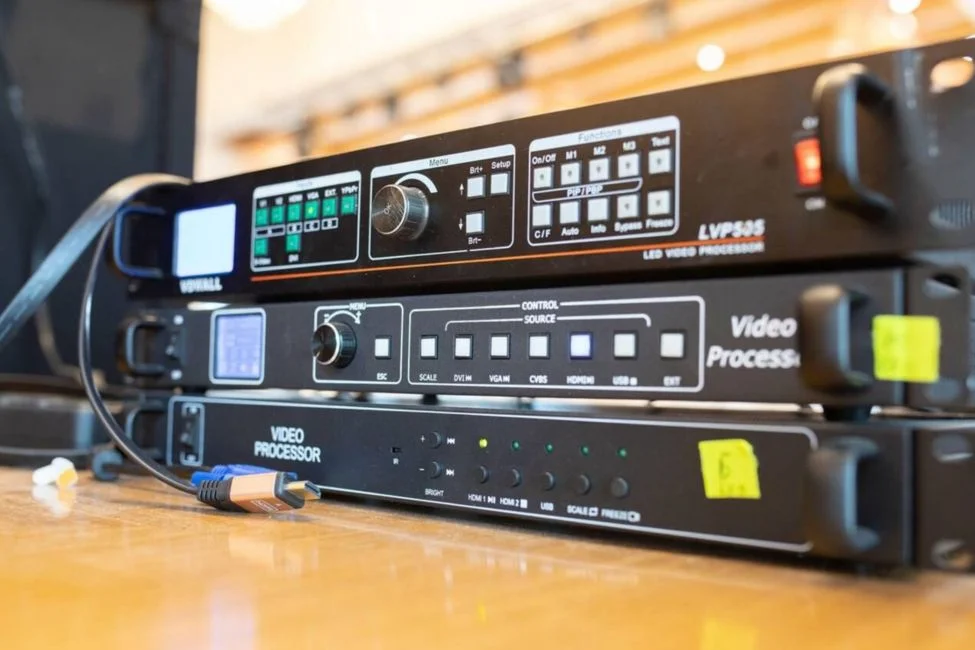
An LED processor is the piece of equipment that takes incoming video content and prepares it for display on an LED video wall.
The wall itself is only one part of the system. The processor helps manage resolution, scaling, signal distribution, screen layout, and how content is mapped across the individual LED panels.
Most guests will never see the processor, but it has a major effect on whether the screen looks correct. It helps make sure the image fills the wall properly, appears in the right position, and matches the actual dimensions of the display.
Planning an event that needs a large digital display? Explore One Of A Kind Events’ LED video wall rentals in New Jersey for corporate events, weddings, brand activations, and live productions.
What Does an LED Processor Do?
An LED processor sits between the video source and the LED wall.
That source could be:
- A laptop
- Presentation computer
- Media server
- Camera system
- Video switcher
- Playback computer
The processor receives the video signal and prepares it for the specific LED display being used.
That may involve resizing the content, positioning it correctly, and sending the right portion of the image to each section of the wall.
Scaling the Video Signal
The resolution of the source does not always match the resolution of the LED wall.
For example, a presentation may be created at 1920 × 1080, but the LED wall itself may have a completely different pixel resolution depending on its size and configuration.
The processor can scale the incoming signal so the content fits the display correctly.
Without proper scaling, an image could appear stretched, cropped, too small, or surrounded by unused screen space.
Mapping Content Across the LED Wall
LED walls are built from multiple cabinets or panels connected together.
The audience sees one large image, but the system still needs to know which part of that image belongs on each section of the display.
The LED processor helps map the content across the wall so everything lines up properly.
If the wall is several panels wide and several panels tall, the processor helps make sure one continuous image appears across the entire display instead of each panel acting like a separate screen.
Managing Different Screen Layouts
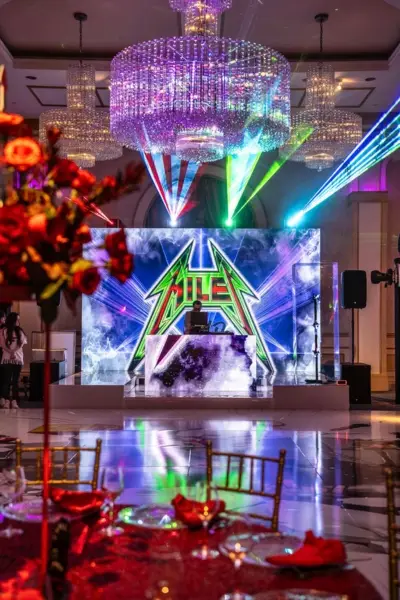
Not every LED wall uses the same shape or dimensions.
Some are standard rectangles. Others may be extremely wide, tall, divided into multiple sections, or integrated into a custom scenic design.
The processor helps accommodate those different layouts.
Content can be positioned and scaled around the actual shape of the display instead of assuming every LED wall uses a standard television style format.
This becomes especially important for custom stages and corporate productions where the screen design may be built around the event rather than using a standard 16:9 layout.
Why Does an LED Wall Need a Processor?
LED panels cannot simply receive any video signal and automatically know how that content should appear across the finished wall.
The processor acts as the connection between the video source and the display hardware.
It takes the incoming signal and translates it into something the LED system can display correctly.
Matching the Content to the Screen
One of the main jobs of the processor is making sure the content fits the actual LED wall.
Proper processing helps avoid problems such as:
- Stretched images
- Cropped content
- Black space around the image
- Graphics appearing in the wrong position
- Portions of the wall displaying incorrectly
That does not mean the processor can fix poorly created content.
If a logo is low resolution or a presentation was built in the wrong format, the processor cannot magically replace missing image quality. Its job is to properly adapt the incoming signal to the screen being used.
Maintaining a Consistent Image Across the Display
The entire LED wall needs to behave like one coordinated display.
The processor helps send the correct image information to each section of the wall so the final picture remains properly aligned.
Each panel is part of a larger canvas.
The processor helps make sure those individual sections work together so the audience sees one continuous image instead of a collection of separate LED panels.
LED Processor vs Video Switcher
An LED processor and video switcher are both commonly used in event video systems, but they handle different jobs.
What a Video Switcher Does
A video switcher allows the production team to move between different video sources.
For example:
- Laptop → presentation
- Camera → live speaker feed
- Playback computer → video
During a corporate event, the operator might switch from a presentation to a live camera feed and then to a prerecorded video without changing anything physically on the LED wall.
The switcher determines which source is being sent forward in the system.
What the LED Processor Does
The LED processor takes that selected signal and prepares it for the LED wall.
A simple way to think about it is:
The video switcher decides what content is being shown.
The LED processor determines how that content is displayed on the wall.
Larger event productions often use both.
The switcher handles the different sources, while the processor makes sure the selected source fits the LED display correctly.
How LED Processors Affect Event Content
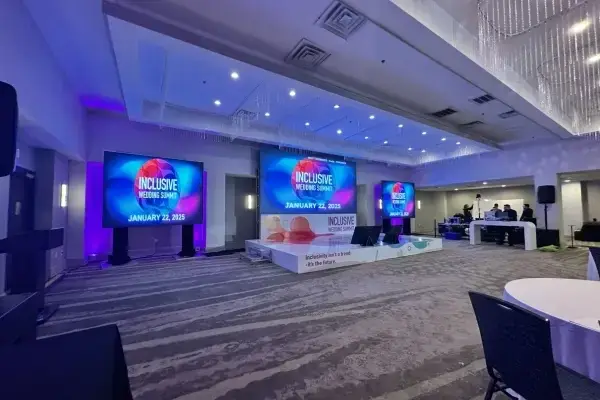
The processor becomes especially important once real event content starts moving through the system.
Presentations, videos, live cameras, and branded graphics do not always match the exact shape or resolution of the LED wall. The processor helps adapt that content so it works on the actual display.
Presentations and Corporate Graphics
Corporate presentations are often created in standard formats, but the LED wall may not use a standard screen shape.
If the wall is unusually wide, tall, or custom built, a normal presentation may not fill the display correctly without planning.
The processor can scale and position the content, but the best results still come from designing graphics around the actual LED wall dimensions.
Videos and Motion Graphics
Video content may also need to be resized or positioned to fit the display.
A standard video can be adapted to the wall, but motion graphics created specifically for the LED canvas usually look cleaner.
That is especially true for extra wide screens or custom stage layouts where a normal video frame does not naturally match the display.
Live Camera Feeds
Large conferences, awards programs, and corporate events often use live cameras so the audience can see speakers more clearly.
Those camera feeds can be shown full screen or placed inside a branded layout.
The processor helps position the live feed correctly within the LED wall so it works with the rest of the visual design.
Multiple Content Areas
Some LED walls are used for several visual elements at the same time.
For example:
- Presentation content in the center
- Event branding on the sides
- Speaker information below
- Sponsor content in another area
This type of layout needs to be planned between the content team and the LED system.
The wall may look like one screen, but different sections can still serve different visual purposes.
Does the LED Processor Affect Image Quality?
Yes, but it is only one part of the overall picture.
The quality of the original content, LED panels, screen resolution, signal path, and system configuration all matter too. For more on preparing graphics, presentations, videos, and branding for the screen, see our guide to LED video wall content.
Scaling Quality
When content is resized poorly, it can appear soft, stretched, cropped, or incorrectly proportioned.
A properly configured processor helps preserve the appearance of the incoming signal when adapting it to the LED wall.
The Processor Cannot Fix Bad Source Content
A processor cannot create detail that was never there.
If the original logo, photo, presentation, or video is low resolution, enlarging it for a large LED wall may still make those limitations visible.
Good results start with properly prepared source files.
For more on preparing graphics and visuals for the screen, see our guide to LED video wall content.
What Determines Which LED Processor is Used?
Clients generally do not need to choose the processor themselves.
The production team selects equipment based on the size, configuration, and content requirements of the LED wall. Not sure what size display your event needs? Use our LED wall size guide to compare common dimensions and understand how screen size affects viewing distance and content.
LED Wall Resolution and Size
A larger or higher resolution wall requires more processing capability than a smaller display.
The processor has to handle the total pixel area of the finished screen.
Number of Inputs
A simple event may only need one presentation laptop.
A larger production may involve several sources, including cameras, presentation computers, playback systems, and video switchers.
The system has to be built around what the event actually needs to display.
Screen Configuration
A standard rectangular LED wall is relatively straightforward.
A custom screen shape, multiple LED walls, or several separate display areas may require a more advanced processing setup.
Type of Event
Different events place different demands on the video system.
A wedding may use an LED wall primarily for graphics, photos, or entertainment visuals.
A corporate conference may need presentations, speaker graphics, videos, cameras, sponsor content, and multiple live sources throughout the day.
The processor should match the complexity of the production.
What Event Planners and Clients Actually Need to Know
Most planners and clients do not need to understand the technical details of LED processing.
What matters is giving the production team the information needed to build the right system.
Know What Content You Plan to Show
Before the event, identify what will actually appear on the wall.
That may include:
- Logos
- Presentations
- Videos
- Photos
- Sponsor content
- Live camera feeds
- Motion graphics
Knowing this early helps determine the screen layout and video workflow.
Provide Content Early
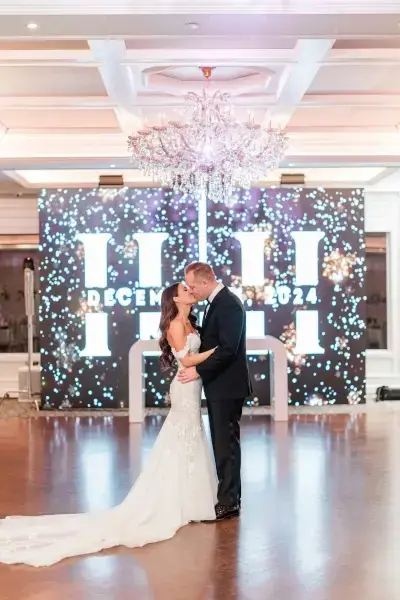
Content should be delivered with enough time for the production team to review it.
That includes checking resolution, aspect ratio, file dimensions, video formats, and playback requirements.
Finding a problem before show day is much easier than trying to fix it while guests are entering the room.
Confirm the Final LED Wall Layout
Content should be designed around the actual LED wall.
Do not assume every screen will use a standard 16:9 format.
Wide LED walls, custom configurations, and scenic installations may use completely different dimensions.
Once the final layout is confirmed, graphics and videos can be prepared around the real display instead of being forced into it later.
Frequently Asked Questions About LED Processors
What is an LED processor?
An LED processor is the equipment that takes a video signal and prepares it to display correctly on an LED video wall.
Does every LED wall need a processor?
In a professional event setup, yes. The processor helps manage scaling, mapping, screen layout, and how the video signal is distributed across the wall.
Is an LED processor the same as a video switcher?
No. A video switcher changes between different video sources, while the LED processor prepares the selected signal for the LED wall.
What content can an LED processor handle?
It can support content such as presentations, videos, motion graphics, sponsor graphics, live camera feeds, and branded visuals, depending on the full video system.
What should I send the production team before the event?
Send your presentations, logos, videos, motion graphics, sponsor content, and any other visuals early so the team can review resolution, aspect ratio, dimensions, and playback requirements.
Conclusion
An LED processor is the behind the scenes equipment that takes video signals and prepares them for an LED wall. It handles tasks such as scaling, mapping, screen layout, and signal distribution so content appears correctly across the finished display.
Planning an event with a large digital display? Explore One Of A Kind Events’ LED video wall rentals in New Jersey to see how our team handles the complete system, from screen configuration and processing to content playback and onsite production.